Designing a Better Way to Work
Designing a Better Way to Work
I'm partnering with Mugen to redesign their productivity platform. The goal is to make complex task management feel effortless through clean, intuitive design. This involves creating a seamless web experience that showcases their platform's power through purposeful animations and thoughtful interactions.
The visual system focuses on fluid motion and clear hierarchy, helping users understand how work moves through their platform. Through interactive demonstrations, users can quickly grasp how Mugen transforms their daily workflow, while maintaining focus on what matters most - getting things done.
TIMELINE
Add timeline
ROLE
Add role
CLIENT
Add duration
Designing a Better Way to Work
I'm partnering with Mugen to redesign their productivity platform. The goal is to make complex task management feel effortless through clean, intuitive design. This involves creating a seamless web experience that showcases their platform's power through purposeful animations and thoughtful interactions.
The visual system focuses on fluid motion and clear hierarchy, helping users understand how work moves through their platform. Through interactive demonstrations, users can quickly grasp how Mugen transforms their daily workflow, while maintaining focus on what matters most - getting things done.
TIMELINE
Add timeline
ROLE
Add role
CLIENT
Add duration
02 - CONTEXT
one form, mirrored across two screens.
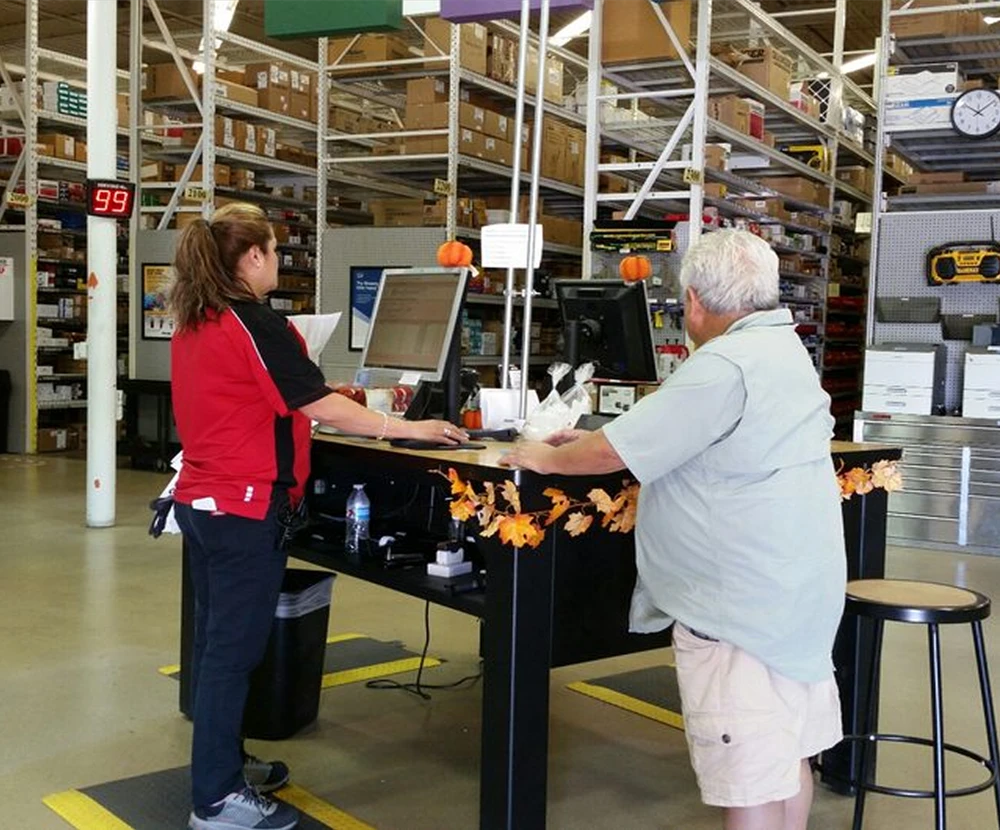
Privacy depended on employees consistently following the proper procedures.
Employees were expected to turn off the customer-facing monitor when entering sensitive information. However, during my branch visit, I observed this was not consistently practiced.
03 - PROBLEM

at the branch said
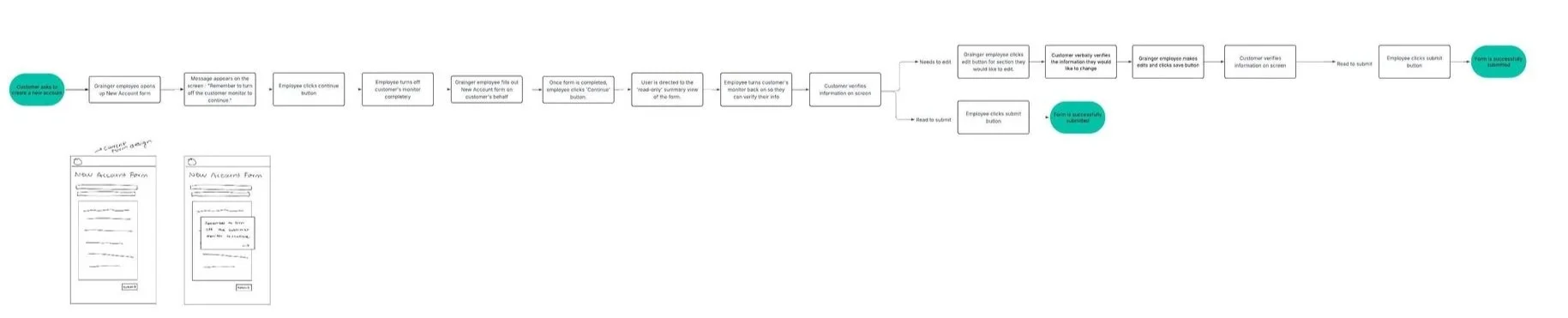


08 - FINAL FLOW
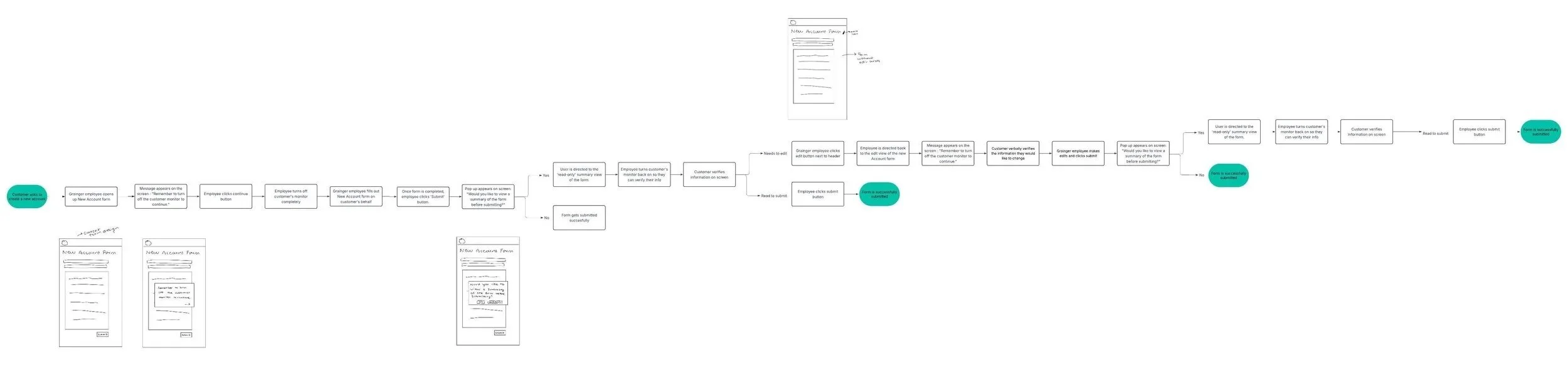
The final workflow:
Step 1
Firstly, a branch member receives a notification to turn off the monitor before they continue to the form.
Step 2
Step 3
Step 4
Step 5
Step 6

09 - IMPACT
THE SOLUTION
A guided privacy flow that separates sensitive input from customer input
Enhance your project showcases with tailored descriptions that provide context and highlight key aspects of your process.
Step 1
Firstly, a branch member receives a notification to turn off the monitor before they continue to the form.
Step 2
Step 3
Step 4
Step 5
Step 6
02 CONTEXT
02 - CONTEXT
02 - CONTEXT
one form, mirrored across two screens.
one form, two screens.
one form, mirrored across two screens.
one form, mirrored across two screens.
03 - PROBLEM
03 - PROBLEM
Privacy depended on memory.
Privacy depended on memory.
Privacy depended on memory.
Employees knew what they were supposed to do. But in a live customer interaction, protecting information meant noticing the right field and knowing when to bring the customer back in (which was not happening).
Employees knew what they were supposed to do. But in a live customer interaction, protecting information meant noticing the right field and knowing when to bring the customer back in (which was not happening).
This created 3 problems:
03 - THE PROBLEM
Privacy depended on employees consistently following the proper procedures.
Employees were expected to turn off the customer-facing monitor when entering sensitive information. However, during my branch visit, I observed this was not consistently practiced.

THE CHALLENGE
Privacy shouldn't come at the cost of a good customer experience.
So, how might we redesign the workflow to protect sensitive data without disruptions?
Keep It Conversational
Guide employees through privacy steps without interrupting the natural customer interaction.
Reduce Cognitive Load
Make privacy actions simple and intuitive, so employees don’t have to think twice.
Standardize Privacy
Create a consistent privacy workflow that works across every Grainger branch.
Keep It Conversational
Guide employees through privacy steps without interrupting the natural customer interaction.
Reduce Cognitive Load
Make privacy actions simple and intuitive, so employees don’t have to think twice.
Standardize Privacy
Create a consistent privacy workflow that works across every Grainger branch.
08 - FINAL FLOW
The final workflow:
Step 1
Firstly, a branch member receives a notification to turn off the monitor before they continue to the form.
Step 2
Step 3
Step 4
Step 5
Step 6
The final workflow:
08 - FINAL FLOW
Step 1
Firstly, a branch member receives a notification to turn off the monitor before they continue to the form.
Step 2
Step 3
Step 4
Step 5
Step 6
08 - FINAL FLOW
08 - FINAL FLOW
The final workflow:
The final workflow:
Step 1
Firstly, a branch member receives a notification to turn off the monitor before they continue to the form.
Step 2
Step 3
Step 4
Step 5
Step 6
09 - IMPACT
09 - IMPACT
09 - IMPACT